1 minute readImproved
The workspace you pick stays picked, and you can tell them apart
The workspace menu shows each workspace's role and short id, the choice holds across pages, devices and sign-ins, and Settings has its own picker. Owners are asked once to name a workspace still called My Workspace.
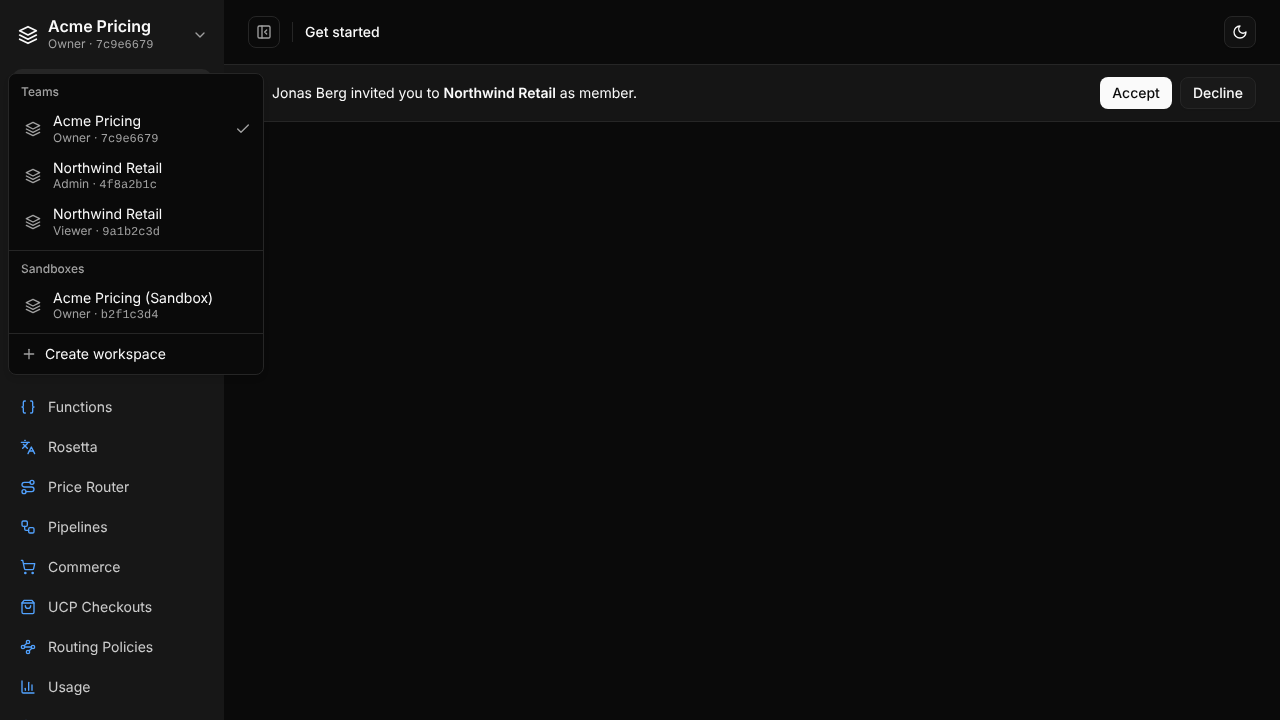
Two workspaces with the same name looked identical, and the choice reset on some pages. Now:
- Each workspace in the menu shows your role there and the start of its id.
- The workspace you pick is kept on your account, so every page and API call made from the dashboard uses it until you pick another.
- Settings has a workspace picker at the top, so you can change another workspace's settings without leaving the page.
- The Company page shows the workspace name and id, with a Rename button for owners and admins.
- A new owner whose workspace still has its default name is asked to name it, once.
- Your user id is on the Security tab of your profile, for an owner who adds you directly.
For help, write to support@last-price.ai.