2 minute readNewAgent-ready
Approve what your agents ask for, from your phone
When an agent asks to spend more than its limit, you get a notification on your phone with Approve and Decline. The new Agents tab in the mobile app lists every request and your agents, and claims an agent from its claim link.
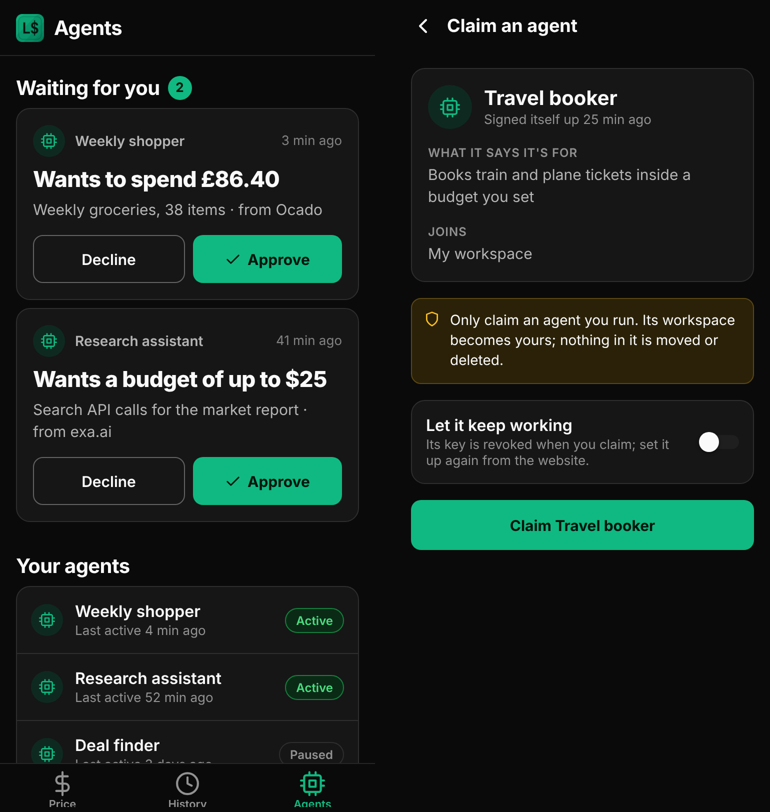
The mobile app has an Agents tab for the agents that buy and work for you.
- Approve from the lock screen. When an agent asks for approval, for example to spend £86.40 at Ocado or to open a $25 budget for API calls, every owner and admin of the workspace gets a notification saying who is asking, how much and what for. Tap Approve or Decline; the agent sends its request again and it goes through, or does not.
- Waiting for you. The Agents tab lists every request still waiting, largest words first: who asks and what they want to spend. Decide each in one tap.
- Your agents. Each agent with when it was last active and whether it is active or paused.
- Claim an agent. An agent that signed itself up gives you a claim link. Open it on your phone, or paste it into the app, see what the agent says it is for, and claim it into your workspace, keeping its key working or not. Only an owner or admin can claim, as on the website.
- API.
POST /api/mobile/push-tokenregisters a phone for approval notifications andGET /api/mobile/featuressays what the app shows.POST /api/agents/claimalso accepts the app's own sign-in for a person.