2 minute readNewAgent-ready
Set what your buyer agents may spend, and have them ask before they pay
A spend policy caps what your buyer agents pay: the most per purchase, a daily cap, a threshold above which a person approves, and which sellers. Any buyer agent checks a purchase before paying and gets allow, deny or ask.
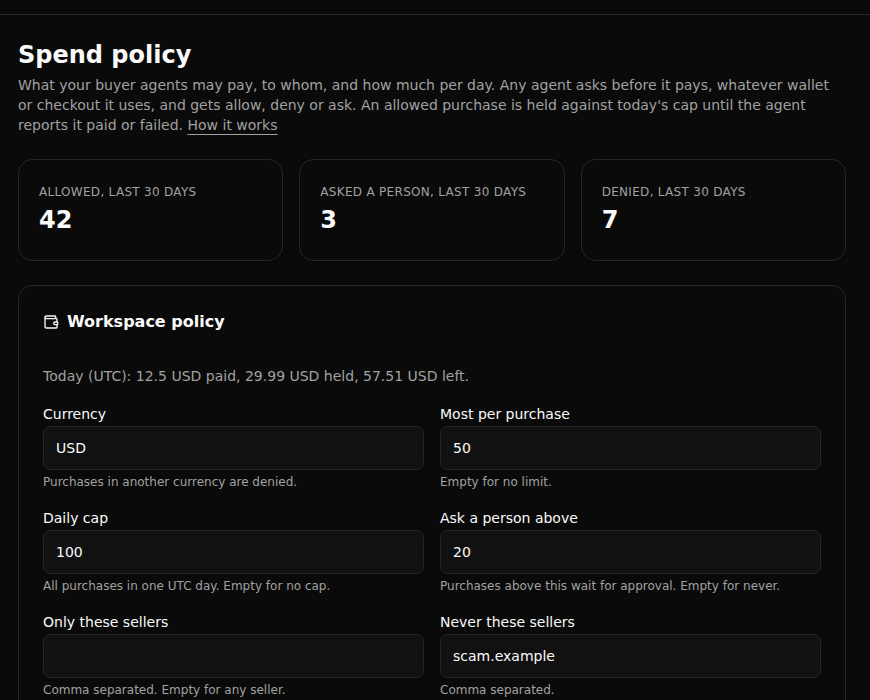
Agents that buy things need limits their owner sets, checked before the money moves.
- One policy, every buyer agent: set the most per purchase, a daily cap, an amount above which a person approves first, and allowed or blocked sellers and categories. Set it for the whole workspace or for one agent.
- Ask before paying: an agent calls
check_purchase(orPOST /api/spend-policy/check) and gets allow, deny or ask, with a reason. It works with any wallet or checkout the agent pays through. - The daily cap holds under load: an allowed purchase reserves its amount at once, so two purchases racing for the last of a budget cannot both go through. The agent then reports what it paid, or that the purchase failed and the budget comes back.
- People approve, never the agent: above your threshold the check opens an approval in your Approvals queue, and an agent can never change the policy it spends under.
- Optional fair price check: the policy can ask or deny when verify_price judges a price too high for what it buys.